Red button: raise the emergency stop from a browser
The stop of the finance system is a file: the status command reads it, and the demo refuses to start when it exists. Raising the stop from a terminal means remembering the path of the file. A page with one button does the same thing with one click.
1. What the page is
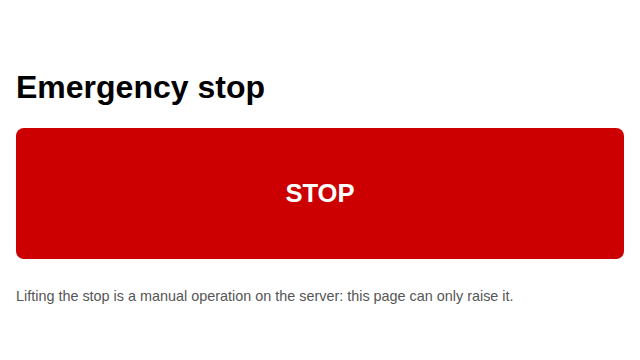
GET /emergency returns the page templates/emergency_page.html (the home GET / is the dashboard). It has a red <button id="stop">, a <p id="stopped"> hidden at
the start, and a <p id="error"> hidden at the start. When the page loads it
reads GET /status; if the stop is already raised, #stopped is shown.
import threading
import urllib.request
from werkzeug.serving import make_server
from dashboard.app import create_app

app = create_app("/tmp/emergency_demo/c.toml")
server = make_server("127.0.0.1", 0, app)
port = server.server_port
thread = threading.Thread(target=server.serve_forever, daemon=True)
thread.start()
try:
    with urllib.request.urlopen(f"http://127.0.0.1:{port}/") as resp:
        print("status:", resp.status)
        print("content-type:", resp.headers.get("Content-Type"))
        print("has id=stop:", 'id="stop"' in resp.read().decode())
finally:
    server.shutdown()
    thread.join(timeout=2)
2. The page before and after the click
The button, before a click:
After a click, fetch("/emergency-stop", {method: "POST"}) creates the stop
file. The page shows #stopped and the file is on disk:
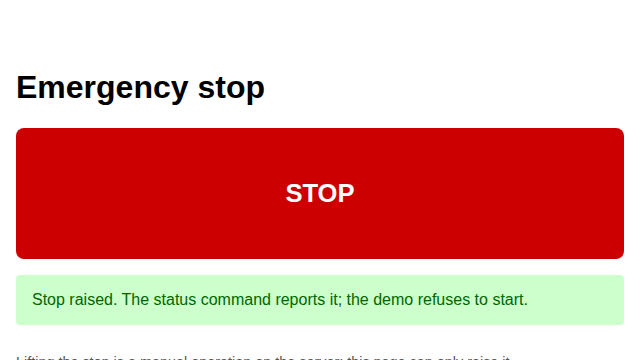
The screenshots come from tools/finance_emergency_screenshots.py, which starts
the dashboard as the tests do and takes the two images with Playwright on the
same Chromium.
3. The same thing without a browser
The page is a thin client over the same route the test uses. Without a browser,
a POST creates the file and a GET /status reports it:
import json
import threading
import urllib.request
from werkzeug.serving import make_server
from dashboard.app import create_app

app = create_app("/tmp/emergency_demo/c.toml")
server = make_server("127.0.0.1", 0, app)
port = server.server_port
thread = threading.Thread(target=server.serve_forever, daemon=True)
thread.start()
try:
    with urllib.request.urlopen(f"http://127.0.0.1:{port}/status") as resp:
        print("before:", json.loads(resp.read())["emergency_stop"])
    req = urllib.request.Request(
        f"http://127.0.0.1:{port}/emergency-stop", method="POST"
    )
    with urllib.request.urlopen(req) as resp:
        print("status:", resp.status)
        print("body:", resp.read().decode().strip())
    with urllib.request.urlopen(f"http://127.0.0.1:{port}/status") as resp:
        print("after:", json.loads(resp.read())["emergency_stop"])
finally:
    server.shutdown()
    thread.join(timeout=2)
The POST is idempotent for the file: a second click leaves one file, not two.
GET /emergency-stop is 405: a read does not change the state.
Details
References.
- Playwright documentation, Browser and Page
(playwright.dev/python). Used for chromium.launch(), page.goto,
page.click and page.wait_for_selector, the same calls the tests use.
- Flask documentation, Testing Flask Applications
(flask.palletsprojects.com). The server of the tests is
werkzeug.serving.make_server on a free port, the same approach.
Choices stated explicitly.
- The page has no external resource: no CDN, no font, no script. It works with
no network other than the local server.
- The page lifts nothing. There is no button that removes the stop file: a stop
raised by a button is a decision for a person, made on the server. The page
says so in a paragraph.
- At load the page reads /status. If the stop is already raised, the page
shows #stopped without a click. This is a real difference between a page
that only reacts to a click and a page that reports the state.
- The error branch is tested with the server stopped after the load: the click
fails, #error becomes visible, #stopped stays hidden. A click that fails
is not a click that succeeded.
- The screenshots are committed in docs/assets/finance/emergency/. They are
regenerated by the tool; the tool is in tools/ and it is not a test.
Declared limits.
- The button does not stop any running process. It creates the file
paths.emergency_stop; the status command of F8 reports it and the demo of
F10 reads it at its start.
- There is no login. The page must stay on 127.0.0.1 or behind a proxy that
has one. Anyone who reaches the page can raise the stop.
- One browser engine, Chromium, tested. Firefox and WebKit are not.
- The screenshots are from one machine, one browser version and one screen size
(640x360). A different size changes the layout, not the behaviour.
- Lifting the stop is a manual operation on the server: the page has no route
that removes the file, and this is a declared limit, not a missing feature.
These pages describe what the code does on the data shown. Not a forecast, not financial advice.