Grids and objects
What it is
Grid and ArcObject are the two things you need to start on a task of the
ARC-AGI benchmark: the cells, and the groups of cells a person would see as
one shape.
- A grid is a rectangle of cells, each cell one of ten colours, given as a number from 0 to 9.
- An object is a group of cells of the same colour that are connected.
- A bounding box (
bbox) is the smallest rectangle that contains every cell of the object. - A hole is a region of empty cells surrounded by an object.
Why use it: every task shows a grid going in and a grid going out and asks for the rule. To talk about the rule you need to say which cells belong to the same shape.
The example on this page is a 5 by 5 grid with three coloured shapes.
1. Build a grid
Grid.from_list takes a list of rows of integers between 0 and 9 and returns
a grid. The grid is immutable: two equal grids can be used as dictionary keys.
from dense_armor.core.graph import Grid

g = Grid.from_list([
    [0, 1, 1, 0, 0],
    [0, 1, 0, 0, 2],
    [0, 1, 1, 0, 0],
    [0, 0, 0, 3, 0],
    [0, 0, 0, 0, 0],
])
print(g.shape(), g.at(1, 4), g.colors())
shape() is the pair (height, width), at(row, col) is the colour of one
cell, colors() is the set of colours that appear in the grid. A grid that is
empty, not a rectangle, or contains a number outside 0 to 9 raises
ValueError.
2. Find the objects
extract_objects walks the grid cell by cell, groups cells that are connected
and of the same colour, and returns one object per group. The default
connectivity is 4: two cells belong to the same object only if they share an
edge.
from dense_armor.core.graph import Grid, extract_objects

g = Grid.from_list([[0, 1, 1, 0, 0], [0, 1, 0, 0, 2],
                    [0, 1, 1, 0, 0], [0, 0, 0, 3, 0],
                    [0, 0, 0, 0, 0]])
for o in extract_objects(g):
    print(o.color, o.area, o.bbox)
The grid has four objects, not three. The first is the background: 18 cells
of colour 0, the empty part of the grid. Colours 1, 2 and 3 are the shapes a
person would look at. extract_objects(g, by_color=False) joins every
neighbouring cell regardless of colour and returns one single object with
color=None.
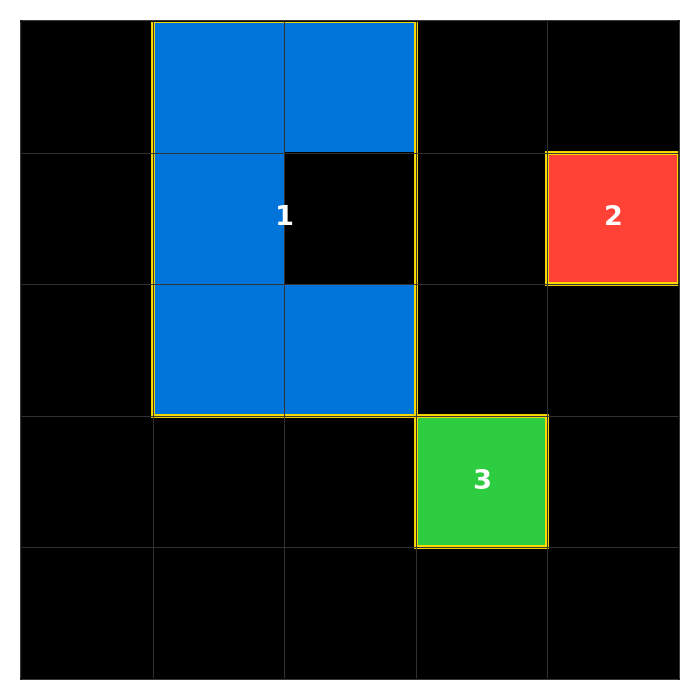
The grid of this page. The yellow boxes are the bounding boxes of the three foreground objects. The number inside is the colour of the object.
3. Read the properties of one object
ArcObject is a dataclass with three fields: cells, color, bbox. The
bbox is (r0, c0, r1, c1), with r1 and c1 exclusive.
from dense_armor.core.graph import Grid, extract_objects

g = Grid.from_list([[0, 1, 1, 0, 0], [0, 1, 0, 0, 2],
                    [0, 1, 1, 0, 0], [0, 0, 0, 3, 0],
                    [0, 0, 0, 0, 0]])
o = [x for x in extract_objects(g) if x.color == 1][0]
print(sorted(o.cells))
print(o.bbox, o.area, o.bbox_area(), o.is_rectangular())
area is the number of cells. bbox_area() is the area of the bounding box
(3 × 2 = 6). is_rectangular() is False because the object does not fill
its bounding box. touches_border(g.shape()) is True because the object has
a cell in row 0.
4. Holes
holes(grid) returns one frozenset of cells per region of empty cells
completely surrounded by the object. A region that opens on the border of the
bounding box is not a hole.
from dense_armor.core.graph import Grid, extract_objects

ring = Grid.from_list([[1, 1, 1], [1, 0, 1], [1, 1, 1]])
u = Grid.from_list([[1, 0, 1], [1, 0, 1], [1, 1, 1]])
print(extract_objects(ring)[0].holes(ring))
print(extract_objects(u)[0].holes(u))
The ring has one hole, the single cell in the middle. The U shape has a
column of empty cells that opens at the top of the bounding box, so it is not
a hole.
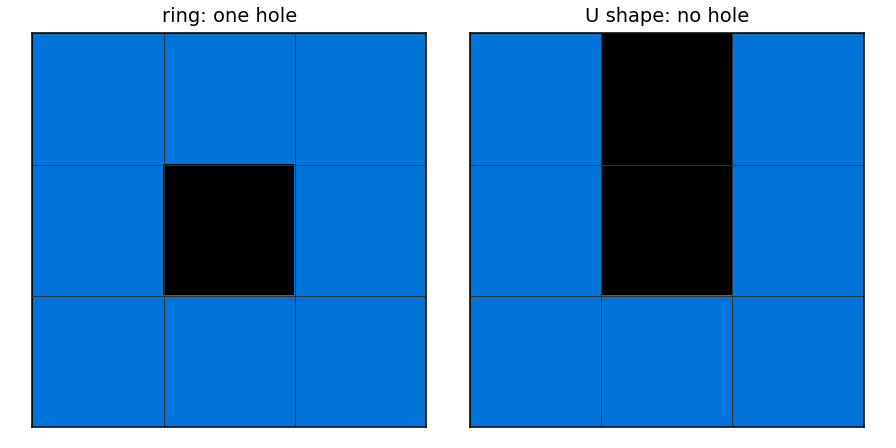
Left: the ring, one hole in the middle. Right: the U shape, no hole: the empty column opens on the top edge of the bounding box.
5. Relations between objects
Five functions answer questions about two objects: adjacent, inside,
same_shape, same_color, distance.
from dense_armor.core.graph import Grid, extract_objects
from dense_armor.core.graph.relations import adjacent, inside, same_shape, same_color, distance

la = extract_objects(Grid.from_list([[1, 0], [1, 1]]))[0]
lb = extract_objects(Grid.from_list([[0, 0, 1], [0, 0, 1], [0, 0, 1]]))[0]
lc = extract_objects(Grid.from_list([[0, 0, 0], [0, 1, 0]]))[0]
print(same_shape(la, lc), same_color(la, lb))
print(adjacent(la, lc), inside(la, lb), distance(la, lb))
same_shape compares the two cell masks once each object is moved to the
top-left corner, so two objects with the same shape but different positions
count as the same shape. inside tests the bounding boxes, not the cells: an
object can sit in a hole of another and still be inside. distance is the
smallest Chebyshev distance between a cell of one object and a cell of the
other.
Details
The Grid class is a frozen dataclass with one field, cells, a tuple of
tuples of integers. from_list and to_list convert to and from the list
format. The class has no method that changes the grid in place; crop, pad,
fill, recolor, shift, upscale, downscale, rot90, rot180,
rot270, hmirror, vmirror, dmirror all return a new grid.
ArcObject is a frozen dataclass with cells: frozenset[tuple[int, int]],
color: int | None, bbox: tuple[int, int, int, int]. extract_objects
gives color=None when by_color=False; every other case gives the colour of
the cells in the object.
holes finds the connected components of non-object cells inside the bbox
using 4-connectivity, and discards the components that touch the bbox border.
A single cell surrounded by the object is a hole of size 1.
The five functions of relations.py are pure: adjacent uses 4-connectivity,
inside is a containment test on the bounding boxes (an object is not inside
itself), same_shape normalises each object to the top-left corner,
same_color compares the two colours and returns False if either is
None, distance is the minimum Chebyshev distance between cells.
References
The Grid and ArcObject classes have no paper behind them: the format is
the one of the ARC-AGI benchmark, described in Chollet, "On the Measure of
Intelligence", arXiv:1911.01547, Section 2. The ten colours and their
assignment to the numbers 0 to 9 are from the same benchmark.
The palette used in the figures is the one of the benchmark's web display,
fchollet/ARC-AGI, apps/css/common.css. The ten colours, from 0 to 9:
#000000, #0074D9, #FF4136, #2ECC40, #FFDC00, #AAAAAA, #F012BE,
#FF851B, #7FDBFF, #870C25. The library does not ship a palette; the
figure script docs/assets/ontology/arc_figures.py defines it.
Choices stated explicitly
- Holes exclude the bbox border. A region of empty cells that opens on the
edge of the bounding box is not a hole. The code and the docstring of
holessay so; the figure shows it with theUshape. insidetests bounding boxes, not cells. An object can beinsideanother even if it sits in a hole, and two objects with the same bounding box count asinsideeach other (unless they are the same object).distanceis Chebyshev. The other common choice (Euclidean) gives fractional values; Chebyshev gives the number of steps a king needs to walk between the two closest cells. ARC asks for integer answers, so Chebyshev is the natural choice here.extract_objectsincludes the background by default. Every cell of the grid belongs to exactly one object; the background is the object of colour- A user who wants the shapes only filters on
color != 0. - No palette in the library. The figure uses the ten colours of the benchmark's web display; the library itself does not assign colours, only numbers 0 to 9.
Relation export
The five functions of relations.py are exported from
dense_armor/core/graph/__init__.py only after the merge of the fix that
adds them to __all__. Until then, import them from
dense_armor.core.graph.relations. The guide on this page uses the second
form; after the merge it is equivalent to from dense_armor.core.graph import
adjacent, inside, same_shape, same_color, distance.