Typed grid graph
What it is
A grid is a rectangle of cells. A graph is a set of nodes and a set of edges.
build_grid_graph turns a grid into a graph with two kinds of nodes and two
kinds of edges, so that a program can ask questions about the grid without
walking the cells again.
- A cell node is one cell of the grid. It holds its row, its column and its colour.
- An object node is one connected group of cells of the same colour. It holds the colour of the object, its area, its bounding box, its cells, whether it touches the border of the grid and whether it has a hole.
- A
belongs_toedge joins a cell to the object it belongs to. - An
adjacent_toedge joins two objects whose cells touch by an edge.
Why use it: with a TypedGraph you check a property of the grid once, as a
constraint attached to the edges, and then ask validate() for the list of
edges that break it. The check is written in one place, not inside every loop
that walks the grid.
The example on this page is a 3 by 3 grid with two coloured shapes and a background.
1. Build the graph
build_grid_graph(grid) returns a TypedGraph. With a 3 by 3 grid it makes
12 nodes: 9 cells and 3 objects. The three objects are the two shapes and the
background, which is also an object (the empty cells of colour 0).
from dense_armor.core.graph import Grid, build_grid_graph

g = Grid.from_list([
    [1, 1, 0],
    [1, 0, 0],
    [0, 0, 2],
])
t = build_grid_graph(g)
print(t.graph.number_of_nodes(), t.graph.number_of_edges())
t.graph is a NetworkX graph, so number_of_nodes() and number_of_edges()
work on it. Twelve nodes are the nine cells plus the three objects; thirteen
edges are the nine belongs_to (one per cell) plus the four adjacent_to
(two pairs of touching objects, counted in both directions).
2. Read the state of an object
Each node of a TypedGraph is a dictionary with two keys: type, the kind of
node, and state, the fields of the node. state is a plain dict, so
["color"] reads one field.
from dense_armor.core.graph import Grid, build_grid_graph

g = Grid.from_list([[1, 1, 0], [1, 0, 0], [0, 0, 2]])
t = build_grid_graph(g)
for n, d in t.graph.nodes(data=True):
    if d["type"] != "object":
        continue
    s = d["state"]
    print(n, s["color"], s["area"], s["bbox"], s["has_hole"])
The first object is the shape of colour 1: three cells, bounding box from
row 0 to row 2 (exclusive) and from column 0 to column 2 (exclusive), no
hole. The second object is the background: five cells, the whole 3 by 3 grid
as bounding box. The third is the single cell of colour 2 in the bottom
right. Every object has has_hole=False: none of them surrounds a region of
empty cells completely, on this grid.
3. Check the constraints
A TypedGraph carries a Constraint on each edge. validate() walks every
edge and returns the ones whose constraint answers False. On a graph built
from a clean grid, the list is empty.
from dense_armor.core.graph import Grid, build_grid_graph

g = Grid.from_list([
    [1, 1, 0],
    [1, 0, 0],
    [0, 0, 2],
])
t = build_grid_graph(g)
print(t.validate())
The two constraints of build_grid_graph are: the cell is in the object,
and the colour of the cell is the colour of the object (on belongs_to
edges), and the two objects share at least one cell boundary (on
adjacent_to edges). Both are checked on the values at the two ends of the
edge; a constraint never reads a third node.
4. Break a constraint
If a value of an object is changed with update and the change is wrong,
validate() lists the edges that now break the constraint. Here the first
cell is removed from the first object, and the belongs_to edge of that cell
is listed.
from dense_armor.core.graph import Grid, build_grid_graph

g = Grid.from_list([[1, 1, 0], [1, 0, 0], [0, 0, 2]])
t = build_grid_graph(g)
cells = list(t.graph.nodes["obj:0"]["state"]["cells"])
t.update("obj:0", cells=tuple(cells[1:]))
print(t.validate())
update(name, **values) changes the fields of one node, with the same type
check as add_node: the new value of cells must be a tuple, as the schema
says. The cell cell:0,0 is no longer in obj:0, so the constraint on the
belongs_to edge that joins them answers False.
5. The graph and the grid
The same graph, drawn next to the grid it comes from. On the right: the
twelve nodes, the nine belongs_to edges as thin lines, the four
adjacent_to edges as thicker lines between the object nodes.
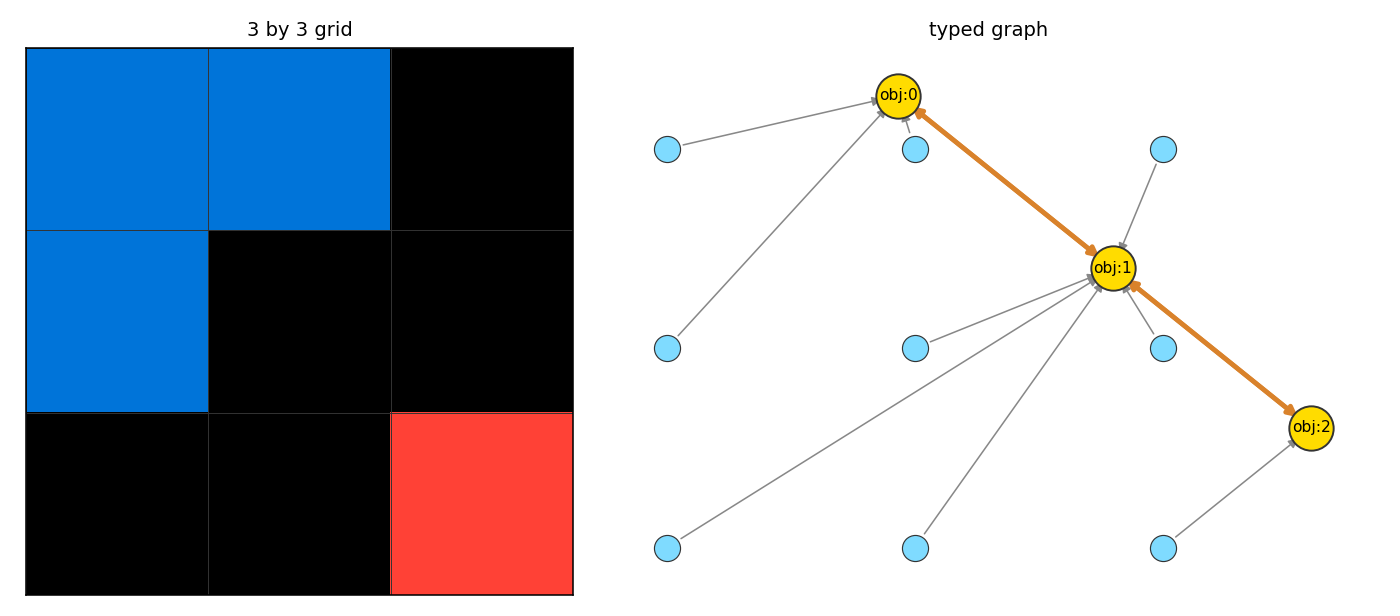
Left: the grid of this page. Right: the graph that build_grid_graph
builds from it. c: is a cell node, o: is an object node.
Details
build_grid_graph is a function, not a method of Grid: it takes a Grid and
returns a new TypedGraph. The TypedGraph does not keep a reference to the
Grid, so changing the graph does not change the grid. Two build_grid_graph
calls on two equal grids return two graphs with the same nodes, edges and
states; the node names are strings ("cell:r,c", "obj:i") and do not depend
on the order of iteration.
The object index in "obj:i" is the position of the object in the list
returned by extract_objects, which walks the grid row by row, so the
numbering is deterministic. by_color=False merges cells of different colours
into the same object; the color field of the object node is then the value
extract_objects gives (which is None), and build_grid_graph stores -1
in its place, because the schema says the field is an int.
The two constraints read only the state of the two ends of the edge. The
belongs_to constraint checks (row, col) in cells and, when the object has
a colour that is not the background marker, that the colours match. The
adjacent_to constraint calls _share_cell_boundary(a, b): a cell of a
has a 4-neighbour in b. A constraint that fails is not an error: validate()
returns the list of failing edges. To turn the list into an error, call
t.validate(raise_on_violation=True), which raises ConstraintViolation; the
page Types, rules and actions covers that form.
References
build_grid_graph has no paper behind it: it is the bridge between the grid
of the ARC-AGI benchmark (Chollet, "On the Measure of Intelligence",
arXiv:1911.01547, Section 2) and the TypedGraph of Dense-Armor. The
TypedGraph and Constraint classes are described in
Types, rules and actions; the page here shows the graph that
build_grid_graph builds on top of them.
The idea of validating an action on the subgraph it touches, rather than on
the whole graph, is the one of G-SPEC (Vijay and Ethiraj 2025,
arXiv:2512.20275, Section 3.2). validate() here walks every edge, because
it is called on the whole graph; a validation that follows the size of a
change is in apply_action, on the same classes.
Choices stated explicitly
- The background is an object. Every cell of the grid belongs to exactly
one object; the background is the object of colour 0. On the 3 by 3 grid of
this page, the background is
obj:1, five cells. A user who wants the shapes only filters oncolor != 0afterextract_objects; in the graph, the object node hascolor=0. by_color=Falseuses-1for "no colour". The schema sayscoloris anint, andextract_objectsgivesNonefor a multi-coloured object.build_grid_graphstores-1in the graph, and thebelongs_toconstraint treats-1as "the object has no single colour", so the colour check is skipped for that object.- Two
adjacent_toedges, not one. The edge is added in both directions (i → jandj → i), becausevalidate()walks every edge and there is no way to look at the edge once. This doubles the count ofadjacent_toedges in the graph. - The graph is a new object, not a view.
build_grid_graphreads the grid once and builds a freshTypedGraph; there is no live link between the two. A user who changes the graph does not change the grid, and a user who changes the grid must build the graph again.